- What is a composite key? We’ll start by defining what a composite key is and when you may encounter one in your database
- Working with composite keys in SDV. Next, we’ll go over the requirements for specifying and modeling databases with composite keys using SDV.
- The “SDV Guarantee” for composite keys. SDV always ensures that the synthetic composite keys it creates are valid. In this section, we’ll cover the exact guarantees that it provides, as well as other statistical patterns that SDV models.
- Schema complexity with composite keys. Finally, we’ll provide a few additional examples of complex schemas that include composite keys. All the complexities can be handled by SDV.
What is a composite key?
When working with relational databases, you may be familiar with the concept of primary and foreign keys that define the connections between tables. A primary key is a column that uniquely identifies every row in the table while a foreign key is a reference to a primary key.When you have a composite key, it means that multiple columns together act as the key rather than a single column. In this context, “composite” means that the key has multiple components (aka columns). Relational databases commonly allow and enforce composite keys. Let’s go through a few types of keys and show how they can be composite.
Composite Primary Key
A composite primary key is when multiple columns together form the primary key for a table. Rather than a single column that uniquely identifies each row, there are 2 or more columns that jointly identify each row. The example below shows a Patient Visits table for a hypothetical doctor’s office. Each row represents a record of a patient visiting the office. In this table, the Patient ID and Date columns together form the composite primary key of the table.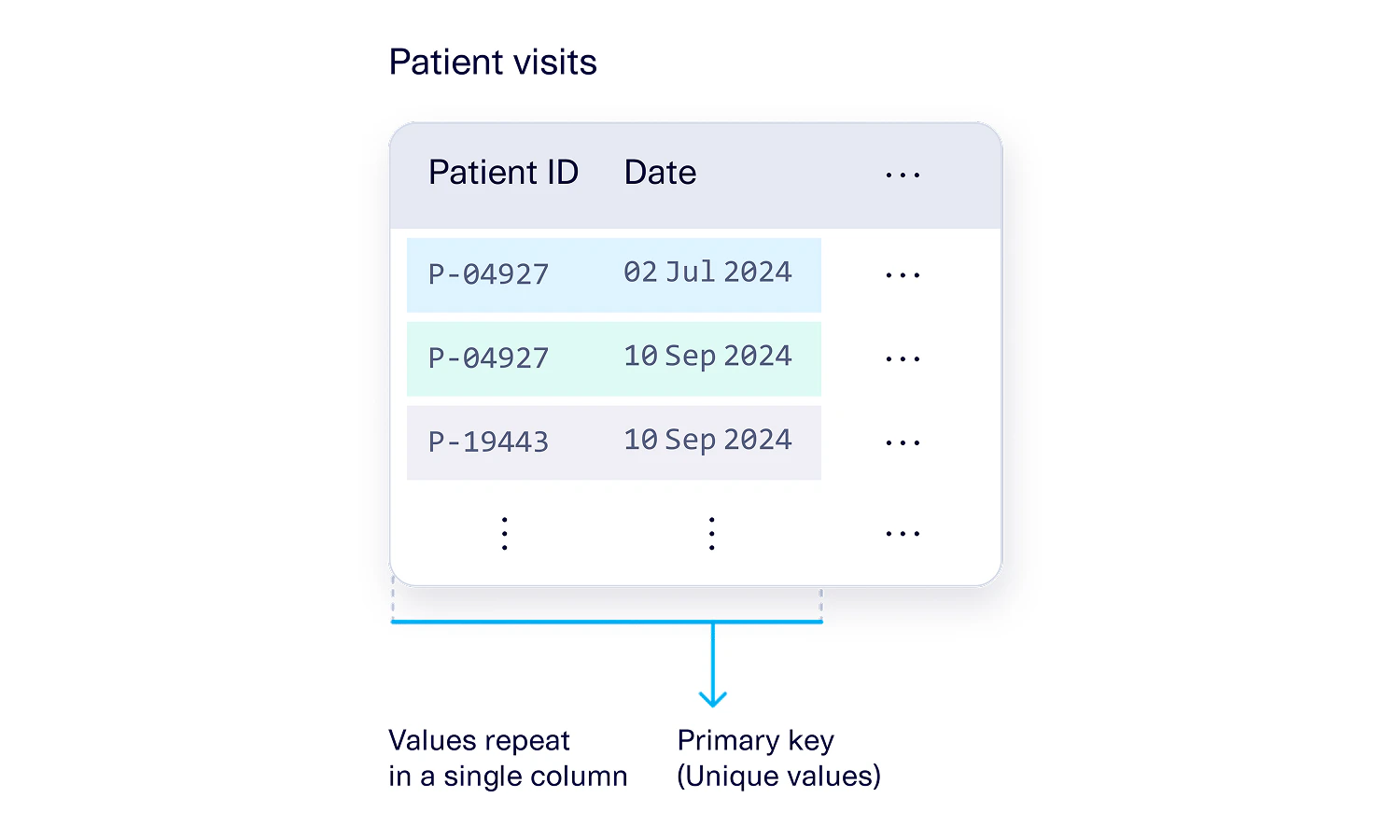
Composite Alternate Key
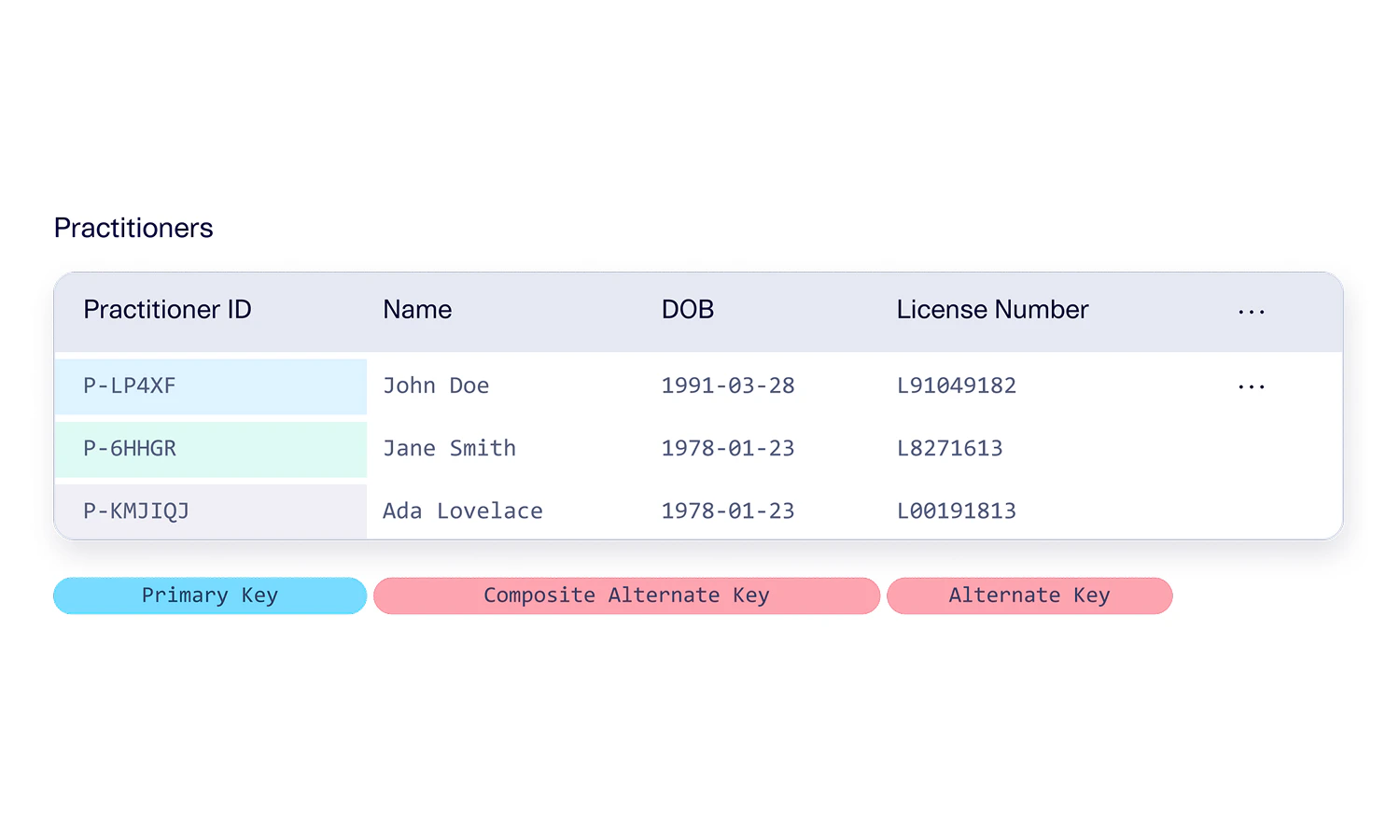
In databases, an alternate key is a column that is not selected as the primary key but still, nonetheless, enforces uniqueness. A composite alternate key is what we call it when the alternate key is composed of multiple columns. You can have a composite alternate key even if the actual primary key of the table is just 1 column. You can also have many different alternate keys that are different lengths. For example:- The doctor’s office may maintain a table of Practitioners. This may just have a single primary key column, Practitioner ID.
- But there might be a composite alternate key composed of the practitioner’s Name and Date of Birth. This means that the name and date of birth together are enough to uniquely identify a practitioner (rather than using the Practitioner ID), but this is not the official primary key of the table.
- There might also be another alternate key with just 1 column, such as the practitioner’s license number. This is allowed as long as the license number is also unique.
Composite Foreign Key
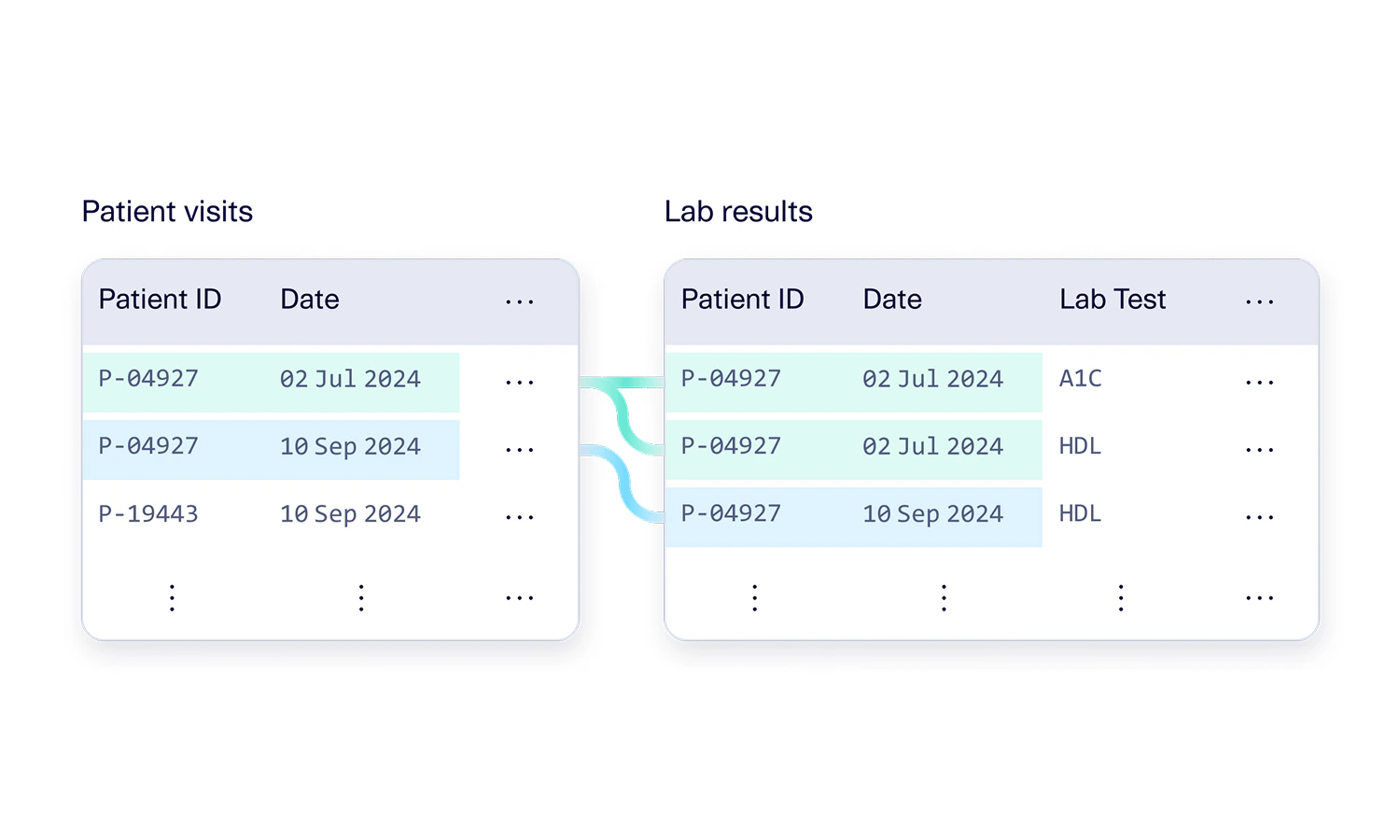
Finally, we also have composite foreign keys. Similar to how a regular foreign key works, a composite foreign key references a primary key. Composite foreign keys don’t have to be unique, but they do have to match up with the primary keys that they are referencing. This means:- A composite foreign key must have the same number of columns as the primary key that it is referencing, and
- All of the columns in the composite foreign key must match up with all of the columns of a primary key
Working with Composite Keys in SDV
SDV integrates with and models schemas with composite keys as long as they follow the definitions set by relational databases (described in the previous section).Specifying Composite Keys in the Metadata
When working with SDV, all the primary and foreign keys should be specified in the SDV Metadata. Composite keys are designated by using a list of multiple column names, rather than a single string. At this time, metadata auto-detection and AI Connectors do not automatically detect composite keys. Please add them manually following the guidance below. For each table, specify composite primary keys as a list, and composite alternate keys as a list of lists.Why do the lengths of the composite keys have to be the same? When there is a foreign key, relational databases require that the reference unambiguously refers to a single row of the parent table. In order to have an unambiguous reference, the number of columns involved in the composite key must be the same.For example, if only the Patient ID column were listed as a foreign key, then it could refer to many possible visits. However, the combination of a Patient ID and Date unambiguously references a single row in the Patient Visits table.
Composite Key Sdtypes
The “columns” section of the SDV metadata should list out the synthetic data type (sdtype) for each column, including the columns in composite keys. For example, the Patient visits table should list out the sdtype corresponding to the Patient ID, Date, and any other column that’s in the table.- Statistical sdtypes such boolean, categorical, numerical, or datetime columns
- ID sdtypes that have a Regex format
- PII sdtypes that represent real world concepts like phone numbers or emails
Modeling & Creating Composite Keys Synthetic Data
While anyone is allowed to create and validate a metadata with composite keys, only SDV Enterprise users will be able to create a synthesizer with that metadata. The steps for modeling and creating synthetic data remain the same.The “SDV Guarantee” for composite keys
The synthetic data that SDV Enterprise creates for composite keys is guaranteed to be valid. In this section, we’ll define in more detail what exact guarantees this translates to.Guarantee #1: Realistic values in each column
The synthetic data in every column will contain realistic values … including any column that is part of a composite key. The exact details of this guarantee depend on the sdtype of the data.
For example, for the Patient visits table, SDV guarantees that the Patient ID will adhere to the right format, and that the visit Date is in a realistic range (as defined by the real data); you will not see an unrealistic, out-of-bounds date such as a date in the far past like Jan 10, 1667.
Guarantee #2: Primary Key Uniqueness
Any synthetic data created for a composite primary key is guaranteed to have unique combinations throughout the table. For example, when creating synthetic data for the Patient visits table, the combination of Patient ID and Date will always be unique. SDV allows you to create as much synthetic data as you want. When doing this, SDV will combine the logic with Guarantee #1. For example, it will always ensure that the Date is within the correct range. This limits the amount of dates that it can create, but SDV can always create additional Patient ID values as needed.Guarantee #3: Referential Integrity
Any foreign key that SDV synthesizes will always reference a primary key that it has synthesized – aka there will be no broken references. For composite keys, this means that all the values of the composite foreign key will match up with the values of a composite primary key.Guarantee #4: Relationship Cardinality
Finally, SDV also guarantees that the number of connections between a primary and foreign key reference are realistic. This also applies to composite keys. For example, if each patient visit corresponds to anywhere from 0-10 lab tests in the real data, then the synthetic data will continue to maintain the same proportions and same number of connections.Use the Diagnostic Report to check for guarantees
SDV’s diagnostic report checks all the guarantees listed above and returns a score that quantifies whether the guarantees are met. We expect a score of 100%, which indicates that all of the above guarantees are met. (If your score is not 100% for some reason, you can reach out to our team, as this may be a bug for us to fix!)Bonus: Best-effort statistical patterns
The SDV guarantees are meant to always have 100% adherence. But there may be other, probabilistic or statistical patterns in your dataset too. For example, the overall distribution of a column. SDV provides its best-effort in meeting those statistical patterns for every column – even columns that are involved in a composite key. For example, here are some patterns that SDV may learn based on the real data:- The distribution of statistical columns that are part of composite keys (for example of the patient’s date of birth). This includes the mean, max, mode, and general histogram. It will try to replicate this in the synthetic data.
- The distribution of the cardinality, or number of connections between tables. For example, a majority of patient visits may only result in 0 or 1 lab tests being performed. Only 10% of visits may result in 5 or more tests being run.
- The min and max number of repetitions in the ID and PII columns in the composite key. For example, the same Patient ID may appear 3-5 times in the Patient visits table, indicating that most patients visited the office 3-5 times.
SDV Enterprise can handle complex data schemas
As long as you have a valid relational database schema, SDV will be able to learn from the schema and create valid synthetic data for it. For composite keys specifically, SDV Enterprise is able to handle many types of complexities that may arise from the conjunction of primary and foreign key columns. In this section, we’ll go over a few examples of complex situations with composite keys. SDV Enterprise is able to successfully model and create synthetic data for each one.Example #1: Overlapping column in a composite primary key and a foreign key
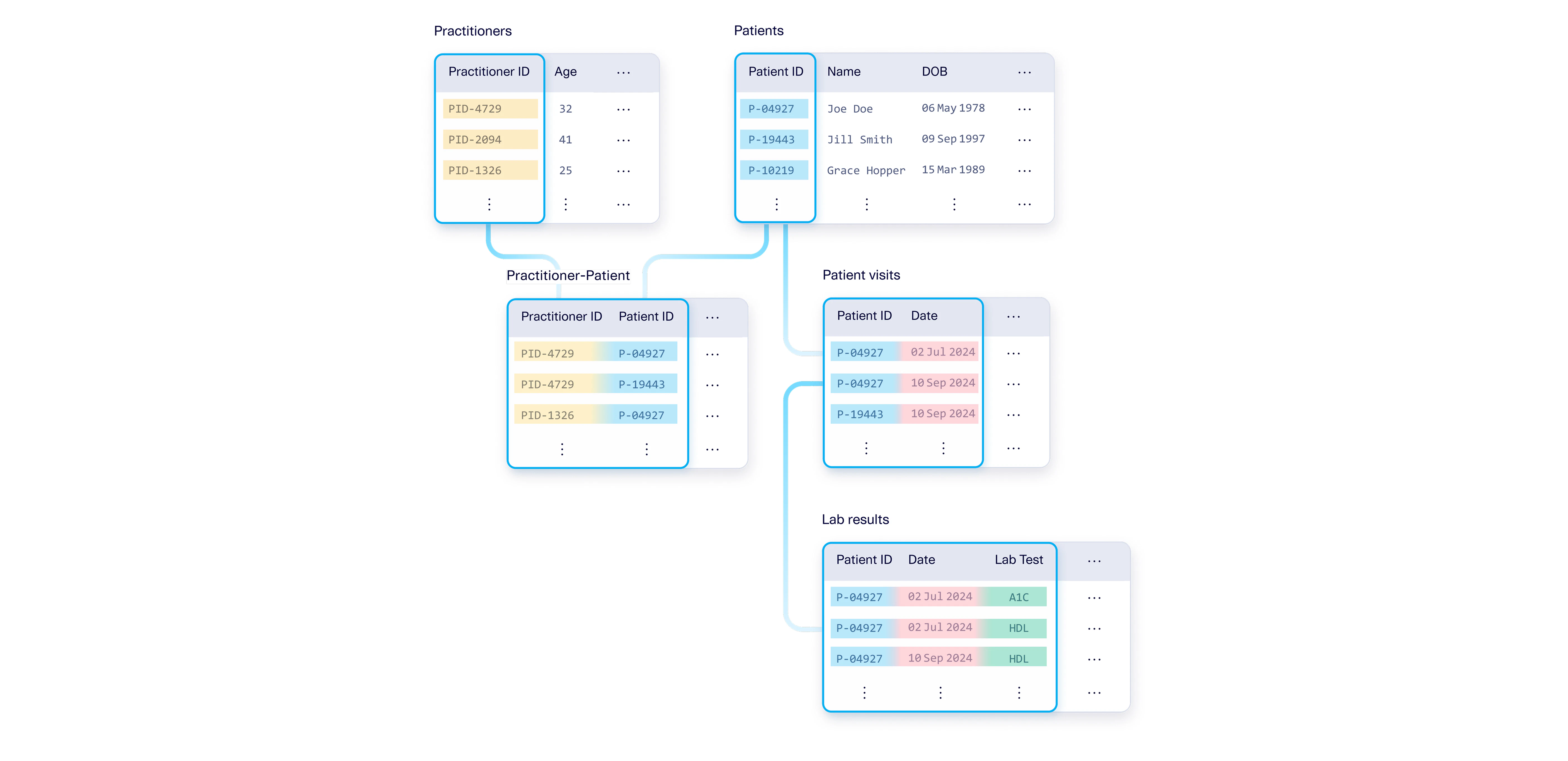
One common situation in enterprise schemas is that one of the columns in a primary composite key is itself a foreign key into another table. For example, the Patient visits table has a composite primary key comprised of the Patient ID and Date columns. But the individual Patient ID column is itself a foreign key into another table that just contains information about Patients. This is allowed because the foreign key (Patient ID) is the same length as the primary key of the Patients table. The Patient ID column is an overlapping column: It is part of both a composite primary key and a foreign key.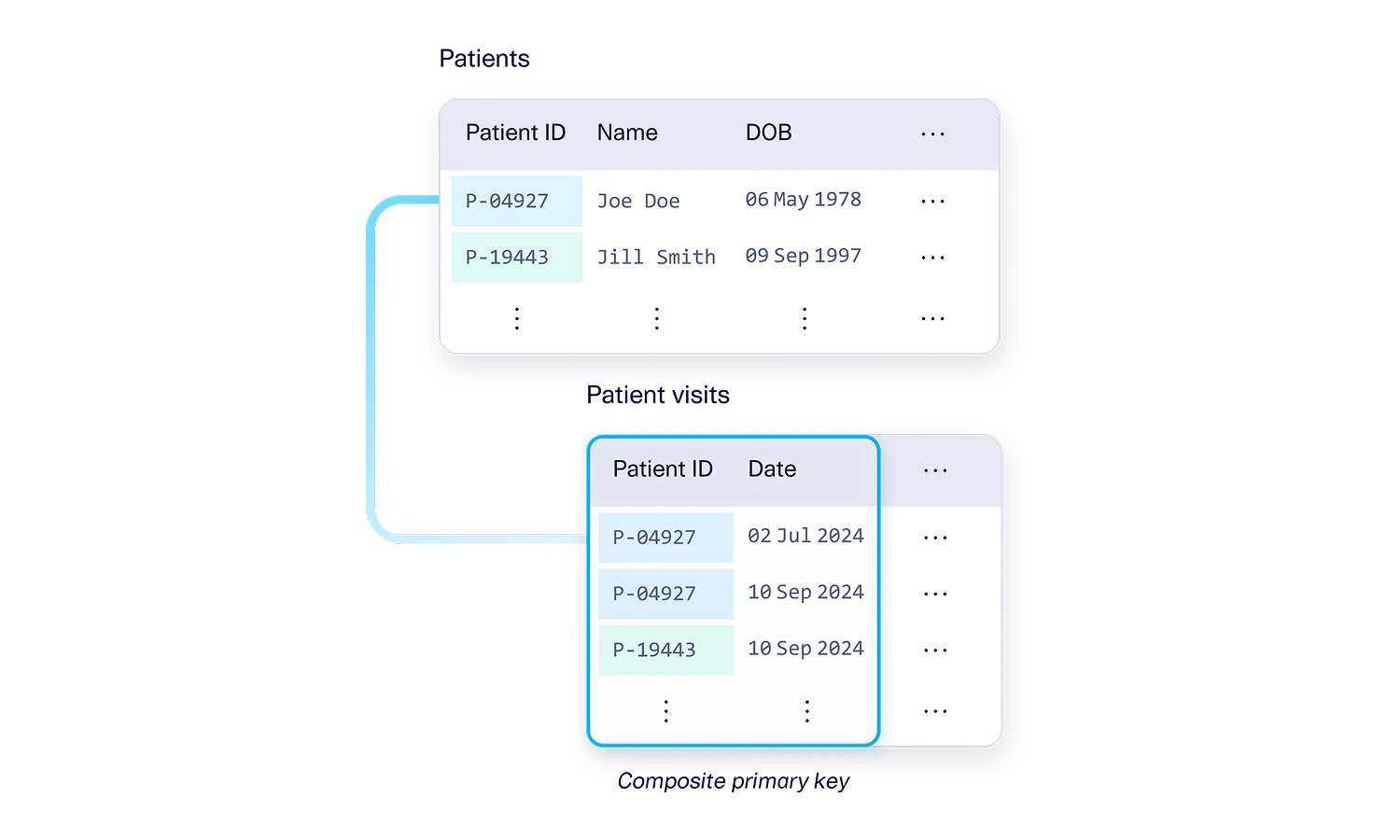
Example #2: Multiple overlapping columns in composite keys
The same concept can also happen with multiple columns. For example, the Lab results table may have a composite primary key with three columns (Patient ID, Date, and Lab Test). Out of these columns, 2 of them (Patient ID and Date) are a composite foreign key into the Patients visits table. This is allowed because the references are the same length – the Patient ID and Date from the Lab results table match up exactly with the Patient ID and Date columns from the Patient visits table.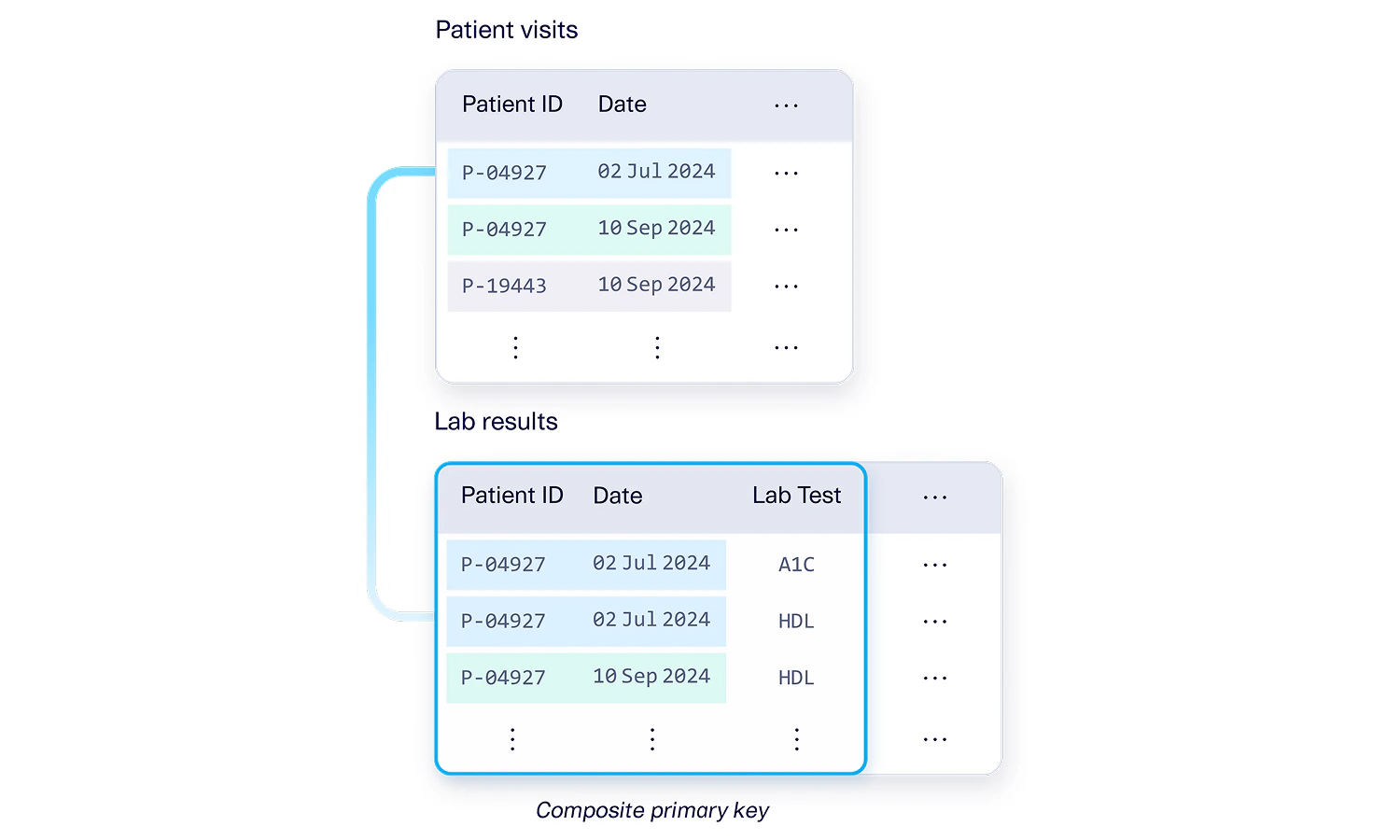
Example #3: Composite key in a bridge table
A bridge table is a table that encapsulates many-to-many relationships between two tables. For example Patients and Practitioners. A Patient can have many different Practitioners (for eg. a primary care physician, dermatologist, etc.) and a Practitioner can have many different Patients. The bridge table connects these two concepts by listing every (Patient ID, Practitioner ID) assignment. Both of these columns in the bridge table are foreign keys. But the bridge table itself can also have a composite primary key. In this case, the Practitioner ID and Patient ID jointly form a composite primary key because this combination needs to be unique – it doesn’t make sense to repeat the same practitioner twice for the same patient. Many enterprise schemas follow this logic to ensure uniqueness in the combinations that the bridge table encapsulates.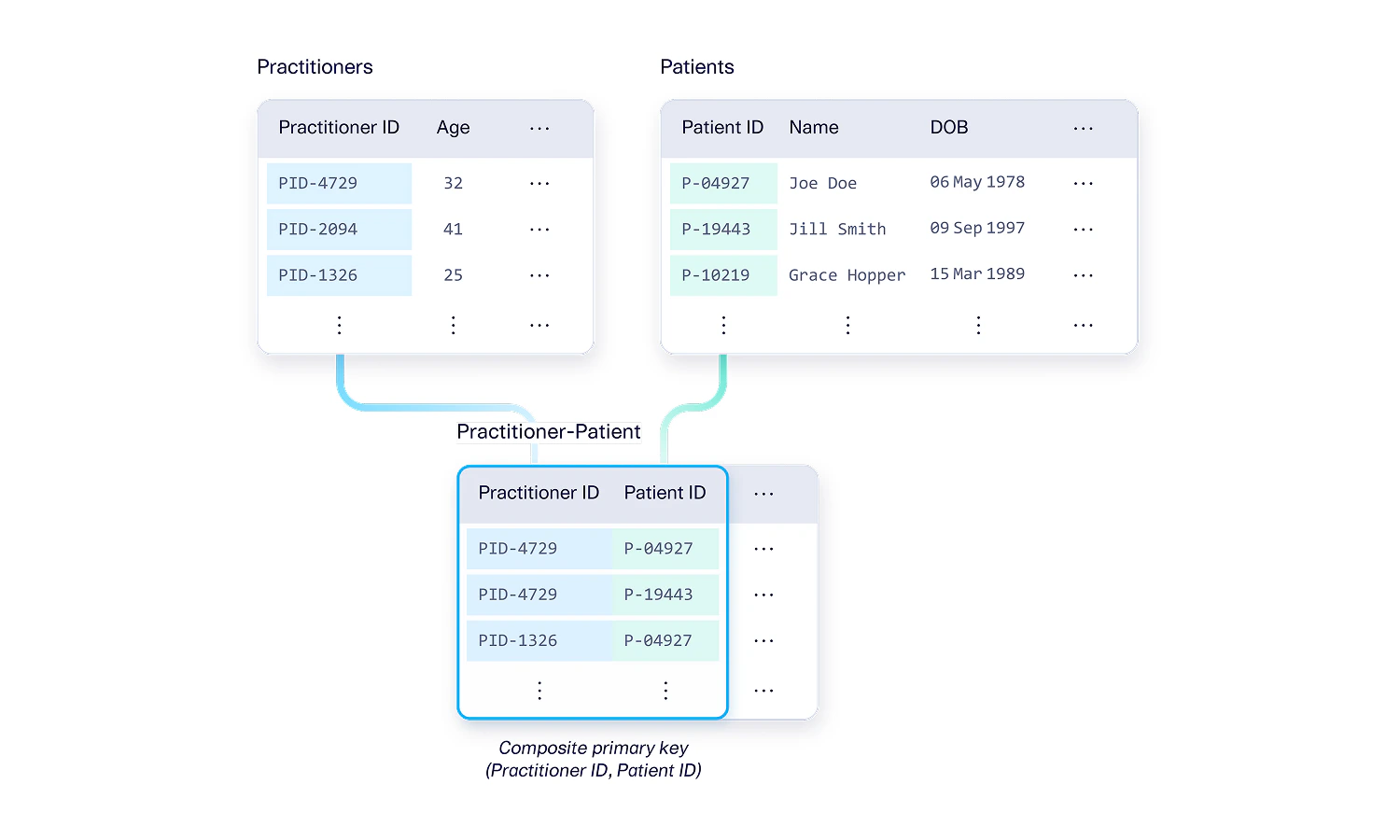
Putting it all together: Combinations of these features are supported too!
The examples we’ve provided in this guide are typically not isolated occurrences. SDV Enterprise is able to handle schemas that have all the features we’ve described so far. For example, each of the tables we’ve shown may appear in a single database schema, with all of the connections with composite primary and foreign keys that overlap and intersect in different ways.